A couple of years ago (in 2022, looking at the date on the presentation), I was tasked with developing some material to raise awareness of computer science – data structures, algorithms, state machines… that kind of thing. This is less of a problem when the audience is mature, but what does one do when it’s secondary school children?
Well, I was a secondary school student once myself (at the time, Jesus was still scouting for disciples), and admittedly, what got me interested in programming was the fact that you could create your own videogames if you had the know-how. That, and my pal Colin, in no particular order.
At the time this task came in, I was also playing ungodly hours of Tiny Rogues, a brilliant little game that you should check out if you haven’t. So putting one and one together, I set out to write a small clone of the game that highlighted two aspects of computer science: computational complexity and data structures. It eventually evolved into something of its own: Tiny Hero.
Projectile Problems
Intuitively, when the primary weapon of the main character is projectiles, testing whether enemies are hit requires us to check whether the projectile and an enemy overlap. This is all well and good when there are just a few enemies on screen. But what if we had hundreds of enemies and dozens of projectiles? Well, let’s face it – nothing much. Modern PCs and even mobile phones can handle this with ease. Still, the numbers can be illustrative. For each frame, we have to check each projectile against each enemy. So assuming we have N projectiles and M enemies on screen, each frame we would need to perform N × M checks.
For each “check”, we need to test for overlap on both axes. This is a 2D game, so we need horizontal and vertical overlap. Consider the image below. The skeleton and the magic missile overlap neither horizontally nor vertically.

In the second image, however, they do overlap on one axis: the vertical axis. Still not enough.

A collision only happens when there’s overlap on both axes, as shown in the final image.

The Time Budget
So why care? Let’s say our game has a limited time budget in which to do game-y things like handle player input, move enemies, react to collisions, and draw the screen. For a game running at 60 FPS, that’s about 16 milliseconds per frame. If we spend too much time on intersection tests, that leaves less time for other stuff like smarter AI or visual effects.
Let’s also define “faster” in a deliberately naïve way: if two methods do the same thing, but one takes fewer steps, it’s faster.
We already know the naïve method takes at least M × N checks. So how can we reduce that number?
Divide and Conquer (with Boxes)
One way is to divide the space the objects occupy into smaller, manageable areas and assign objects to them. Imagine putting all the enemies in a big cyan box. Then, split the box horizontally into two equal parts.

Take the enemies on the right side and make a new green box. The rest go into a yellow box. If a box has more than, say, three enemies, we repeat the process recursively until each final box contains just a few objects.

Eventually we end up with a top-level box containing smaller boxes, which in turn contain other boxes, and so on. This continues until the smallest boxes contain no more than three enemies. The function that performs this split is called recursively, and the condition that tells us to stop splitting is called the base case.


So what’s the benefit? When checking if a projectile hits an enemy, we can first test whether it intersects the top-level box. If it doesn’t, we immediately rule out all the enemies it contains. If it does, we follow the hierarchy down until we reach a small group and check only those.
Let’s say a projectile hits one of the enemies in the green box. That means we’ll test against the cyan box (yes), skip the yellow box (no), enter the green box (yes), then test against the three enemies inside it. That’s six comparisons instead of eight, and the gains only increase as the number of objects grows.
Structurally, this is known as a binary tree. For M projectiles tested independently against N enemies, we now need roughly M × log N steps. That beats M × N, especially at scale.
A Video and a Catch
Here’s a video that demonstrates how this works with hundreds of enemies on screen:
The number of comparisons performed by the BVH method (Bounding Volume Hierarchy) is shown as “BVH Comps”. The naïve brute-force comparisons are shown as “BBX Comps”.
You’ll notice the gap between the two increases with the number of enemies, which means more headroom for cool stuff elsewhere in the game loop.
But to be fair, BVHs aren’t free. You need to build them before you can use them. If the enemies don’t move, you only need to build it once. Even if they do, you don’t need to rebuild it every frame, and you don’t have to start from scratch. For instance, they can be rebuilt periodically (although not continuously) and that gives a good balance between accuracy and speed.
Tiny Hero v2
Last week or so, I was asked to resurrect Tiny Hero for another open day. Just a couple of tweaks, they said. Add a high score. Maybe make the level actually finish.
The original version had one room and an endless flood of skeletons. It was only meant to demonstrate data structures and algorithms under strictly controlled conditions.
So I got to work. First, I added levels you could actually complete. Once you clear the enemies, the doors at the top of the room open and let you through to the next one. That worked, but things quickly got boring with the same enemy types and layout.
Inspired by Tiny Rogues, I added upgrades when moving to the next level. These are selected at random and modify projectile properties like speed, fire delay, number of shots, and spread angle. Eventually, I added more interesting behaviours like bouncing off walls and homing on enemies.
This opened the door to a lot of tweakable attributes: bounce count, seeking strength, range, projectile count, and so on. It started to feel quite satisfying.
But then another design problem cropped up. If Tiny Hero gets lucky with the upgrades, he can spawn-camp or pick off enemies from a distance. That’s not great. So I added a gem drop mechanic. Enemies drop gems on death, but they expire quickly. To collect upgrades, you need to grab these before they vanish: 25 gems per upgrade. This forces the player to move and stay close to the action.
More Enemies, More Chaos
At this point, the gameplay was fun but lacked variety. There was only one real enemy type: skeletons. They wandered around, chased the player when nearby, and fired arrows.
To fix this, I added a few more:
- Slimes are slow but persistent and deal contact damage.
- Ogres roam until they spot the player, then charge in straight lines until they crash into a wall. They stay stunned for a while before trying again.
- Wolves behave like ogres but with shorter, arcing dash attacks.
- Ghosts can pass through walls and follow the player relentlessly.
- Mages are glass cannons. They either cast projectiles or summon reinforcements (skeletons or ghosts).
It was becoming properly fun… I mean, yeah, it’s a face only a parent could love, but still. For the final touches, I added a boss fight, an end screen, high score tracking, and a full UI overhaul. I redrew almost all the graphics from scratch. The only assets I didn’t make myself were a few bought from itch.io (like the ogre, ghost, and some spell effects).
Screenshots and Video
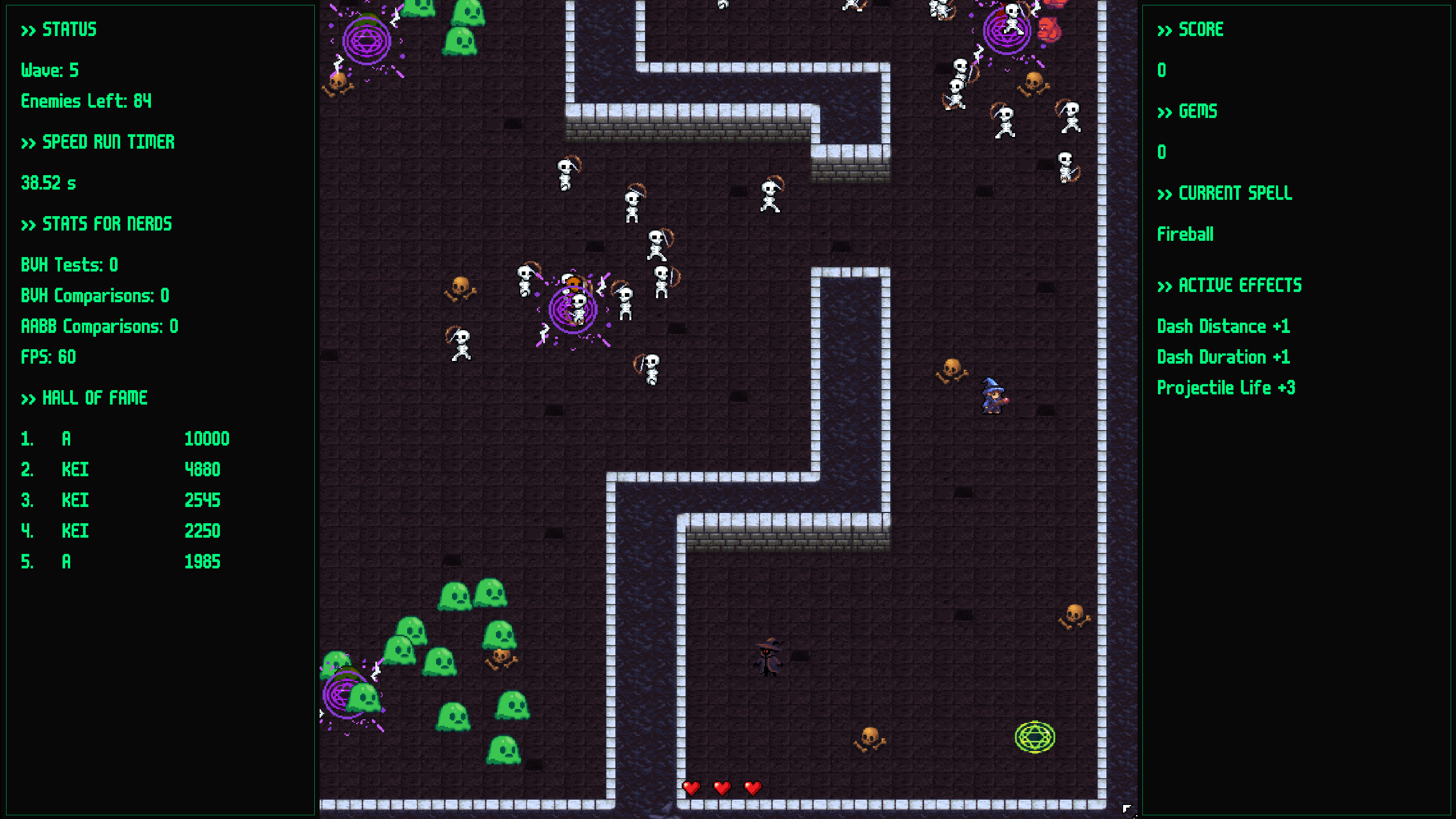
Anyway here’s some screenshots from the new version:


Or better yet, play Tiny Hero in your browser or download a Windows executable.
Leave a Reply